Tiny Skies Fighter Jet Helicopters Getting Started
Your first-hour briefing for Roblox jet and helicopter combat—without wasting Credits.
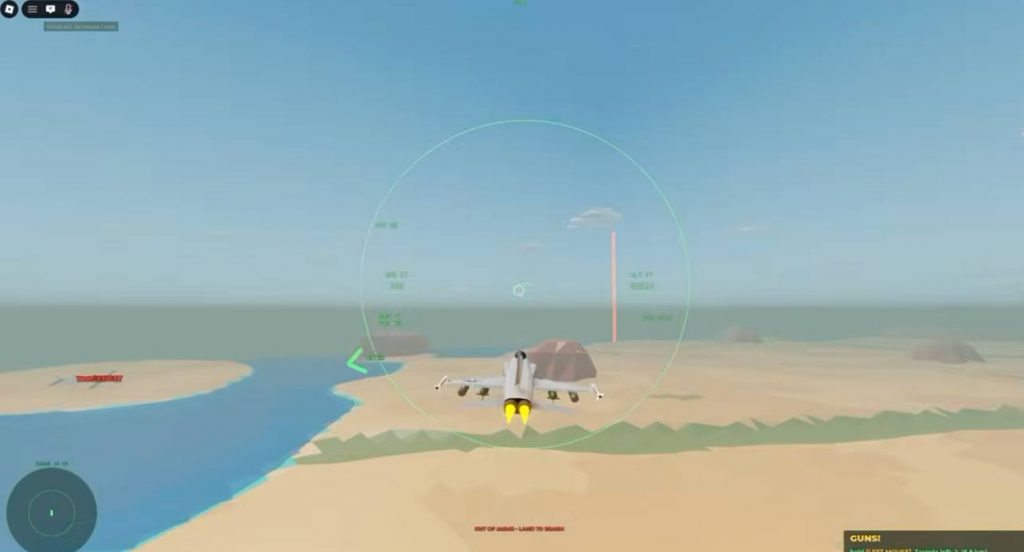
Tiny Skies Fighter Jet & Helicopters is a Roblox air-combat experience by katabin1 where up to 15 players split Blue vs Red across fast jet and helicopter battles. This getting-started guide walks you from first join to a confident second session: controls touchpoints, free aircraft, Flight School Credits, and which wiki pages to open next.
What you are playing
You pilot from a hangar of 21 jets and 7 helicopters. Matches rotate through four modes—Strike base assault, Dogfight, Free-for-All, and Naval carrier battles. Weapons include guns, heat-seekers, radar missiles, rockets, bombs, and anti-ship stores. Mid-match events can spawn bomber raids or convoys. Day/night lighting, carrier launches, and ejection seats add drama when you get tagged.
You do not need premium jets on day one. Free airframes already teach every core loop.
Minute-by-minute first session
1. Join and open Flight School
Before queueing a sweaty PvP lobby, enter Flight School. It teaches takeoff, steering through rings, guns, and landing logic, then pays about 500 Credits—the best guaranteed early payout in the game.
2. Learn the shared control sheet
Every aircraft uses the same scheme (details in Controls):
- Mouse — fly and aim
- Click — guns
Space— missiles / rockets / bombsR— next weaponShift/Ctrl— throttleX— flaresM— mapTab— scoresG— gear
Phone controls are supported; keep the same mental model even if buttons move.
3. Pick a free aircraft
| Free jet | Best first use |
|---|---|
| F-5E | Learn dogfighting |
| MiG-21 | Speed and intercept feel |
| A-4 Skyhawk | Strike practice |
| Free helicopter | Best first use |
|---|---|
| Little Bird | Agile low-alt learning |
| Huey | Stable attack passes |
| Medevac | Gentle rotor intro / support vibe |
Fly one jet session and one helicopter session before spending anything in the Shop.
4. Choose Blue or Red and launch
Enter Battle Mode, pick a team, select your airframe, and launch. On jets, build speed (around the tutorial’s ~150 cue), rotate up, then raise gear with G. Check M so you know where the enemy base or carrier sits before you tunnel-vision a single fighter.
5. Survive your first deaths
You will eject. That is normal. Each death is a control lesson: Did you forget flares? Did you hover a Huey in open sky under an F-14? Did you dive a base alone? Adjust one habit per respawn.
What to do with your first Credits
Priority order:
- Nothing impulsive—bank Flight School Credits.
- Finish daily rewards / missions (see Earn Credits Fast).
- Unlock one aircraft that matches your favorite mode using the tier lists.
- Add upgrades before cosmetics when systems allow.
Skip fake promo lists—Codes currently show no active codes. VIP and Auto Rearm from newer updates are optional QoL, not required to have fun.
Mode cheat sheet for beginners
- Dogfight — spawn F-5E or MiG-21; read Dogfight Guide.
- Strike — try A-4 or Huey/Little Bird; objectives > pure K/D.
- Free-for-All — play safer altitudes; every other pilot is a threat.
- Naval — respect carriers and anti-ship angles; see Match Modes.
Common beginner mistakes
- Skipping Flight School and stalling on every runway
- Holding missiles only—guns win close fights
- Never pressing
Xagainst heat-seekers - Buying a top jet before learning throttle
- Treating helicopters like jets (hovering = death)
- Ignoring Tab score and wondering why the base fell
After the first hour
- Bookmark this wiki’s Guides Hub.
- Skim Jets and Helicopters so you know what you are saving toward (F-22, Su-57, F-35, Apache, Ka-52, and friends).
- Check Updates for event jets such as F-104, F-15 STOL, and Mirage 2000.
- Chase medals and streaks via the Players Hub once basics feel automatic.
Related pages
Launch free, learn fast, spend late—that is the Tiny Skies beginner meta.
Frequently Asked Questions
Quick answers about jets, helicopters, credits, and match modes.
Is Tiny Skies free to play?
Yes. You can fight immediately with free jets and helicopters. Premium aircraft and VIP are optional upgrades.
How many players are in a server?
Matches support up to 15 players in Blue vs Red team combat, depending on mode.
Should I play jets or helicopters first?
Try a free jet (F-5E) and a free helicopter (Little Bird or Huey) for one match each, then main whichever objective style you enjoy.
What should I unlock first with Credits?
After Flight School and a few matches, unlock one aircraft that fits your favorite mode using the tier lists—not a random expensive name.
Are there beginner codes?
There are no confirmed working codes at the moment. Use Flight School, dailies, and missions for early Credits.
Does the game support mobile?
Yes. Phone controls are supported alongside easy mouse aim on desktop. Learn the shared actions even if the button layout differs.